
Too Many Cameras, Too Few Operators
Use video analytics and event-driven monitoring to focus operator attention on situations that require action instead of continuously watching every camera.
Scalable video management for professional CCTV systems — from a single server to distributed multi-site installations, with integrated analytics and open integrations.
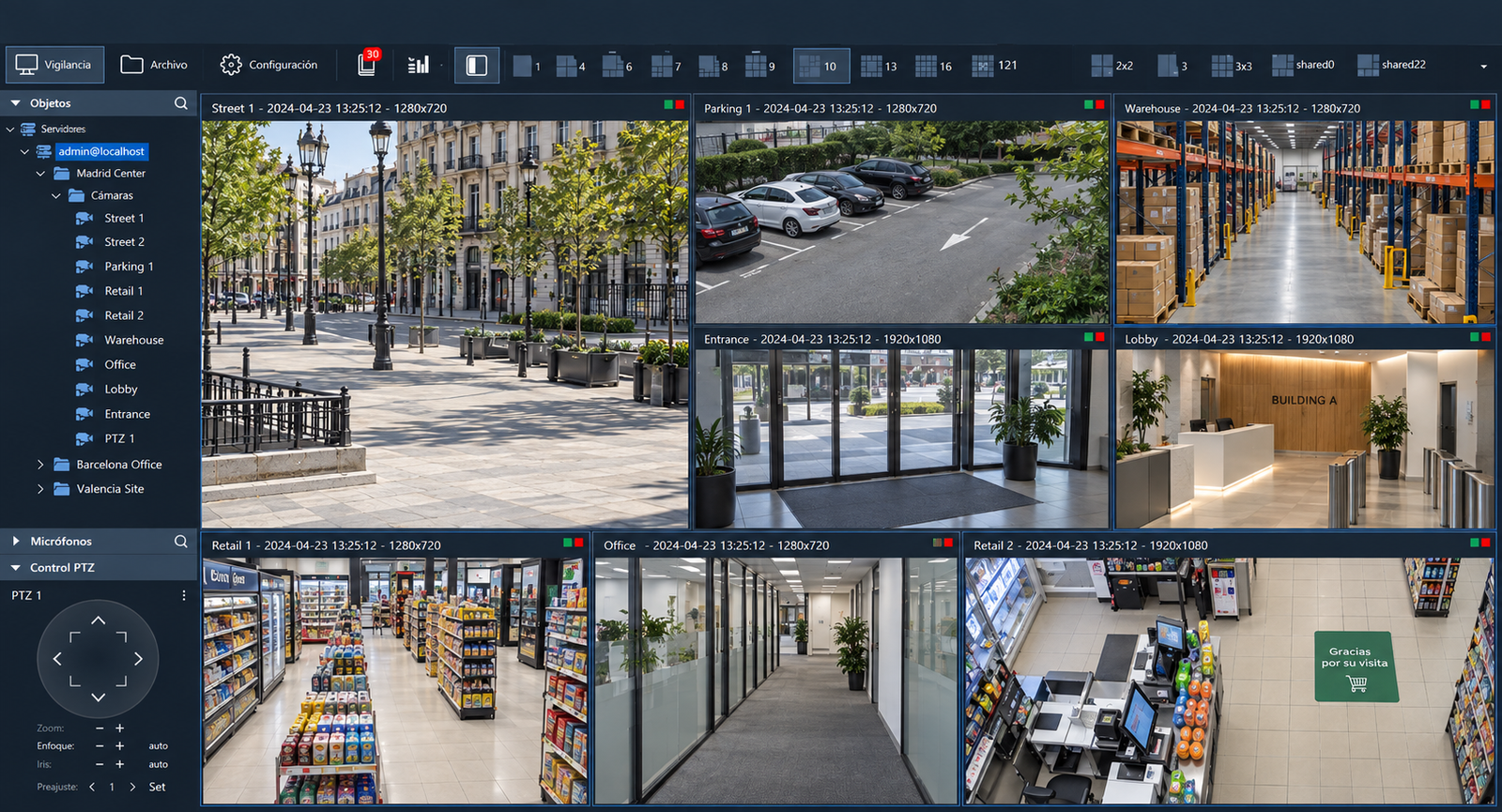
Sagitech VMS is professional video management software for IP video surveillance and CCTV systems. It combines live monitoring, recording and archive access, alarm handling, user management and operator tools in a single platform.
It can be deployed on a single server or scaled to distributed multi-server and multi-site systems. Sagitech VMS supports multi-brand camera environments, integrated video analytics, Windows and Linux, web and mobile access, and third-party integrations through open standards, HTTP API and SDK.
Sagitech VMS helps solve common challenges in professional video surveillance — from managing distributed CCTV systems to reducing operator workload, automating response and making better use of existing cameras.
Use video analytics and event-driven monitoring to focus operator attention on situations that require action instead of continuously watching every camera.
Bring cameras, servers, users and monitoring from multiple locations into one centrally managed video surveillance system.
Keep compatible cameras from different manufacturers and modernize your system gradually instead of replacing the entire video infrastructure.
Use archive tools, events, timelines and analytics data to locate and review relevant video faster.
Automate routine responses with events, scenarios, schedules and actions — from notifications to project-specific workflows.
Use video analytics, statistics and reports to support security, operations and management — not only post-incident investigation.
Sagitech VMS is designed for professional video security projects that require flexibility, reliable operation and room to grow. It combines centralized management, scalable architecture, open integration capabilities and direct project support, helping integrators and organizations build systems around real operational requirements and expand them as those requirements evolve.
Whether designing systems for customers, deploying CCTV projects or managing video security in your own organization, Sagitech VMS provides the flexibility, integration options and management tools required for professional installations.
Build multi-brand solutions, integrate third-party systems through API and SDK, and get direct technical support for project requirements.
Deploy systems faster with broad camera compatibility, flexible editions and project-oriented licensing.
Centralize servers, cameras, users and permissions across multiple locations with monitoring, redundancy and advanced analytics.
For larger and distributed projects, Sagitech VMS provides the architecture and operational tools needed to expand across multiple servers and sites while keeping management, monitoring and system control centralized.
Start with one site and add servers, storage, analytics and locations as the project grows.
Manage remote servers through a unified domain with centralized live view, archive and administration.
Use redundancy, server monitoring and archive controls for higher system availability.
Keep compatible multi-brand cameras and introduce new equipment or analytics gradually.
HTTP API, SDK, ONVIF and RTSP provide flexible integration with third-party systems.
Per-camera perpetual licensing with free updates and technical support.
Add video analytics to turn camera streams into actionable events, statistics and operational data. Sagitech VMS combines analytics with alarms, scenarios and automated actions, helping operators detect important situations faster and automate routine workflows.
Detect security events automatically and bring relevant situations to the operator's attention without continuously watching every camera.
Identify people and vehicles, track detected objects and use recognition results in security, access and investigation workflows.
Transform video into useful operational data for visitor flows, queues, staff activity and customer behavior, with statistics and reports for further analysis.
Use analytics and system events to trigger alarms, notifications and predefined actions, creating automated workflows tailored to the way each site operates.
Sagitech VMS combines the core capabilities required to monitor, record, investigate and manage professional video surveillance systems — from efficient operator workflows to resilient multi-server deployments.
Organize live video, alarms and visual information for efficient day-to-day monitoring and control-room operation.
Build and switch layouts quickly for large camera sets and different operator tasks.
Create centrally managed layouts for user groups and keep them synchronized across operator workstations.
Place cameras on site plans and manage multi-screen video walls from a centralized control point.
Use different camera streams depending on viewing mode and window size to reduce network and client load.
Store video reliably and investigate incidents faster with resilient storage, synchronized playback, smart search and flexible export.
Distribute recording across multiple disks for efficient write and read performance. If one disk fails, recording switches to the remaining disks, available data stays accessible, and users are notified of the storage fault.
Find relevant video by time, events, object position, size and visual attributes instead of reviewing long archive periods manually.
Review the same incident across several cameras on a common timeline.
When a camera switches between primary and backup servers, its recordings remain available to the operator as one continuous timeline.
Export several cameras or selected fragments in one operation. With AVI export, multiple cameras or fragments can also be combined into a single file.
Native archive integration is available for supported NVRs, including Hikvision and Dahua, as well as other integrated devices.
Turn system and analytics events into focused operator attention, notifications and automated actions.
Automatically bring cameras with active alarms to a dedicated operator view and clearly identify the event that requires attention.
Handle current alarms and search historical events from one interface, with CSV export for further analysis.
Create recurring or event-driven workflows from programmable actions and schedules.
Extend workflows with C# scripts, external applications, e-mail and other project-specific actions.
Build centralized multi-server and multi-site systems while preserving availability, centralized control and clear system health.
Combine remote servers into one centrally managed domain with unified access to live video, archive, events and administration.
Work with cameras and archives from multiple independent servers in one client, even when a unified domain is not required.
Assign primary and backup servers to cameras so recording and processing continue on the reserve server if the primary becomes unavailable.
Monitor server reachability, camera status and recording state centrally and surface faults to users quickly.
Manage users, permissions, cameras and configuration across distributed infrastructure from a single environment.
Control access, centralize authentication and retain accountability across professional and multi-site deployments.
Define users and groups with inherited, object-level permissions for cameras and system functions.
Import and authenticate Active Directory users and apply VMS permissions without maintaining separate identities.
Record key user and administrative actions to support accountability and investigation of system changes.
Protect client-server traffic with HTTPS encryption in Enterprise deployments.
Restrict user access by schedule when temporary or time-limited permissions are required.
Use server and client resources efficiently and deploy the system across different operating environments and access points.
Reduce unnecessary video processing and decoding to keep server and client load lower as systems grow.
Use primary and secondary camera streams according to viewing mode and window size to reduce bandwidth and processing load.
Run Sagitech VMS server and client components in Windows and Linux environments.
Give operators and administrators access through desktop clients, an HTML5 web interface and mobile applications.
Use multiple monitors on operator workstations for surveillance and control-room workflows.
Sagitech VMS is available in four editions for different project sizes and requirements, allowing you to select the right functionality for each project without paying for features you do not need.
For small and medium-sized systems.
For professional and scalable systems.
For centrally managed multi-server systems.
Enterprise VMS with a bundled analytics package.
The main differences at a glance.
| Feature / Module | Standard | Professional | Enterprise | Complete |
|---|---|---|---|---|
| Cameras | Up to 30 | Unlimited | Unlimited | Unlimited |
| Servers in the system | 1 | Unlimited | Unlimited | Unlimited |
| Multi-server client access | — | ✔ | ✔ | ✔ |
| Unified server domain | — | — | ✔ | ✔ |
| Redundancy | — | — | ✔ | ✔ |
| Active Directory | — | — | ✔ | ✔ |
| Video Walls | — | — | ✔ | ✔ |
| Basic Video Analytics | — | Included | Included | Included |
| Advanced analytics bundle | — | Optional | Optional | Included |
|
Basic Video Analytics
Included with Professional, Enterprise and Complete editions.
|
||||
| Face Detector Lite | — | Included | Included | Included |
| Sabotage Detector | — | Included | Included | Included |
| Object Tracking | — | Included | Included | Included |
| Loud Sound Detector | — | Included | Included | Included |
|
Advanced Modules & Business Analytics
Available as optional modules in Professional and Enterprise. The modules marked Included are bundled with Complete.
|
||||
| People Counter | — | Optional | Optional | Included |
| Motion Heat Map | — | Optional | Optional | Included |
| Abandoned Object Detector | — | Optional | Optional | Included |
| Fisheye Dewarping | — | Optional | Optional | Included |
| POS Transaction Control (JSON Integration) | — | Optional | Optional | Included |
| Personnel Activity Monitoring | — | Optional | Optional | Included |
| Standalone Microphone Support | — | Optional | Optional | Included |
| InteractiveDome STD — Manual Control | — | Optional | Optional | Included |
|
Neural Network Analytics
Selected modules are included in Complete; items marked Special price are licensed separately.
|
||||
| Neural Network Object Detector | — | Optional | Optional | Included |
| Neural Network Fire and Smoke Detector | — | Optional | Optional | Included |
| Neural Network People Counter | — | Optional | Optional | Included |
| Neural Network Personnel Presence Control | — | Optional | Optional | Included |
| Neural Network Emergency and Fall Detector | — | Optional | Optional | Special price |
| Neural Network In-Vehicle Phone Detector | — | Optional | Optional | Special price |
| Neural Network Abandoned Object Detector | — | Optional | Optional | Special price |
| Neural Network Queue Detector | — | Optional | Optional | Special price |
| PPE Compliance Detection — First PPE Type | — | Optional | Optional | Special price |
| PPE Compliance Detection — Additional PPE Type | — | Optional | Optional | Special price |
|
Additional Modules
Optional in Professional and Enterprise; included in Complete.
|
||||
| QR Code and Barcode Recognition | — | Optional | Optional | Included |
| InteractiveDome PRO — Manual and Automatic Control | — | Optional | Optional | Included |
|
Face Analytics and Recognition (Sagitech FR)
Available in Professional and Enterprise as optional modules; Special price in Complete.
|
||||
| Face Detection | — | Optional | Optional | Special price |
| Face Mask Detection | — | Optional | Optional | Special price |
| Face Recognition | — | Optional | Optional | Special price |
| Face Analytics | — | Optional | Optional | Special price |
| Face Search | — | Optional | Optional | Special price |
| Face Verification | — | Optional | Optional | Special price |
|
License Plate Recognition (Sagitech LPR Nova)
LPR Nova modules are licensed separately.
|
||||
| Nova City (up to 30 km/h*) | — | Optional | Optional | Special price |
| Nova City Global (up to 30 km/h*) | — | Optional | Optional | Special price |
| Nova Highway (up to 270 km/h*) | — | Optional | Optional | Special price |
| Nova Highway Global (up to 270 km/h*) | — | Optional | Optional | Special price |
| Nova Special Vehicles (Add-On) | — | Optional | Optional | Special price |
|
Legacy Analytics
Kept for existing installations. For new projects we recommend the Neural Network Fire and Smoke Detector.
|
||||
| Smoke Detector — Legacy | — | By request | By request | By request |
| Fire Detector — Legacy | — | By request | By request | By request |
Use Sagitech VMS with your existing multi-brand camera infrastructure and integrate video surveillance with the rest of your security and IT environment.
Find the documentation, tools and technical information you need to evaluate, deploy and maintain Sagitech VMS.
Installation, configuration and administration guides for deploying and managing Sagitech VMS.
View DocumentationEstimate the server resources required for your video surveillance project based on cameras, recording and analytics.
Open CalculatorDownload Sagitech VMS installers, clients, utilities and other available software components.
View DownloadsReview supported operating systems, video and audio formats, protocols and key system capabilities.
Detailed technical specifications for project planning and system requirements.
| Parameter | Specification |
|---|---|
| Platform & Deployment | |
| Supported Windows OS | Windows 11 / 10 / 8.1 / 8 / 7 SP1 / Vista SP2; Windows Server 2008 SP2 / 2008 R2 SP1 / 2012 / 2012 R2 / 2016 / 2019 / 2022 / 2025. Both 32-bit and 64-bit systems are supported. |
| Supported Linux OS | Ubuntu 20 / 22 / 24 and Debian |
| Client platforms | Windows desktop, Linux desktop, HTML5 web client, Android and iOS mobile clients |
| System configuration | Local and remote configuration; centralized administration of multi-server systems |
| Multi-monitor workstations | Supported |
| Scale & Architecture | |
| Cameras per server | No software limit; practical capacity depends on hardware, stream parameters and enabled analytics |
| Clients | No software limit; practical capacity depends on server, client and network resources |
| Multi-server operation | Multiple independent servers can be accessed and operated from a single client |
| Centralized multi-server domain | Unified centralized management of distributed servers and sites in Enterprise and Complete editions |
| Server failover | Primary and backup servers can be assigned to cameras for automatic failover in Enterprise and Complete editions |
| Unified archive after failover | Video recorded by primary and backup servers is presented to the operator on a single timeline |
| Video & Audio | |
| Video codecs and optimized streams | JPEG/MJPEG, MPEG-4, H.264, H.265 and compatible vendor-specific H.264/H.265 optimizations, including H.264+, H.265+ and Axis Zipstream streams |
| Video resolution | No software resolution limit; any resolution supported by the camera and codec |
| Audio formats | G.711U, G.711A, G.722.1, G.726, G.729A, AAC, PCM |
| Multi-stream support | Multiple camera streams can be used to optimize viewing, recording and resource consumption |
| Archive & Investigation | |
| Multi-disk archive | Video archives can be distributed across multiple local or network storage volumes |
| Archive fault tolerance | If an archive disk becomes unavailable, recording continues on available disks, data on the remaining disks stays accessible, and users can be notified of the storage failure |
| Archive retention | Individual archive retention periods can be configured for cameras |
| Synchronized playback | Synchronized archive playback from multiple cameras on a common timeline |
| Archive search | Search by date and time, events, object position, size and available object attributes |
| NVR archive access | Native archive access is available for supported NVR platforms; availability depends on manufacturer, model and firmware |
| Video export | AVI, MP4, Sagitech Video and still-frame export |
| Multi-camera / multi-fragment export | Multiple cameras and video fragments can be exported in one operation; multiple fragments or cameras can also be combined into a single AVI file |
| Cameras & Device Control | |
| Supported cameras | More than 5,000 IP camera and NVR models from more than 300 manufacturers |
| Universal connectivity | ONVIF, RTSP, HTTP/HTTPS and native manufacturer integrations |
| Camera discovery | UPnP, Bonjour, ONVIF Discovery and network scanning |
| Camera model / driver detection | Automatic driver and camera model detection during device configuration |
| PTZ control | PTZ movement, presets, tours, focus and iris control, auxiliary functions and advanced Interactive Dome control |
| Security & Administration | |
| Users and permissions | Hierarchical users and groups with inherited and object-level permissions |
| Active Directory | Active Directory integration in Enterprise and Complete editions |
| User activity audit | Key user and administrative actions are recorded for auditing and accountability |
| Secure client-server communication | HTTPS encryption is available in Enterprise and Complete editions |
| Client access restrictions | Access can be restricted to permitted Client IDs |
| Mobile mTLS | mTLS can be used for supported mobile access when configured through external infrastructure |
| Integration & Analytics | |
| HTTP API & SDK | Available from Professional edition for integration with third-party systems and project-specific solutions |
| External modules | Supported from Professional edition |
| Video analytics | Built-in and optional analytics modules for security, operational and business scenarios |
| GPU acceleration | GPU acceleration is supported for selected video analytics and object tracking functions |
| Storage | |
| Storage types | Local disks and storage supported by the operating system, including network storage |
| Filesystem | No VMS-specific filesystem requirement beyond operating-system and storage-driver compatibility |
Sagitech VMS supports multi-vendor projects through supported camera drivers, ONVIF and RTSP. Check the supported camera list for specific models and integrations.
Yes. Enterprise and Complete can combine remote servers into a centrally managed domain.
The VMS is licensed per connected camera. The license is purchased once; updates and technical support are included.
Professional, Enterprise and Complete include Face Detector Lite, Sabotage Detector, Object Tracking and Loud Sound Detector.
No. Complete includes a selected bundle of advanced and neural analytics. FR, LPR and other additional modules remain separately licensed.
Yes. Sagitech provides an HTTP API and SDK for integrations and project-specific workflows.
Yes. Send a free trial request and describe the planned number of cameras and project requirements.
Test Sagitech VMS or discuss architecture, compatibility and licensing for your project.
Offer Sagitech VMS and video analytics in your projects with partner conditions, technical support and direct manufacturer cooperation.